The switch your users never notice

Entra External ID migration with zero downtime and no password resets
Our tenant-local solution deploys directly into your Azure environment, automating migration steps, ensuring compliance, and providing production-ready Azure Bicep templates.
Zero User Impact
Passwords move across in full: no forced resets, no UI changes, users sign in exactly as before
Audit-Ready Security
Runs entirely within your Azure tenant with immutable audit logs and verifiable signatures
Guaranteed Uptime
Incremental, validated migration steps keep production systems online at all times
Seamless Flow Integration
Plug into existing B2C user journeys with minimal policy or UI changes
Event-Driven Integration
Hook into events we optionally send out so that your applications can update their settings
Migration Insights
Get insights about transition state of your users with the data we collect
Migration Process Overview
A visual representation of our streamlined migration workflow
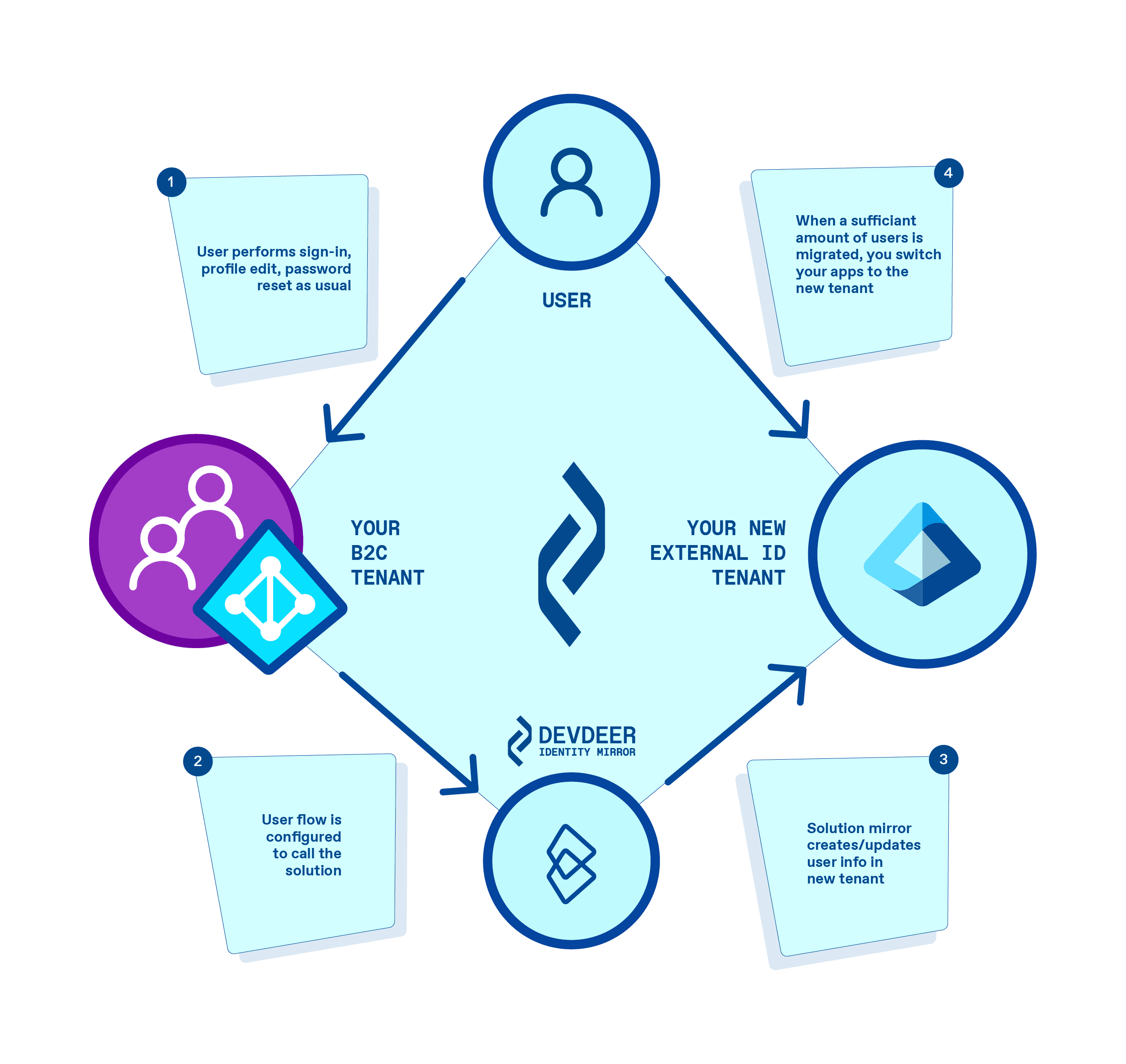
How It Works
A proven four-step process to migrate your users safely and efficiently
- 1
Deploy Mirror Service
Deploy Mirror Service
Install our migration agent into your Azure tenant and connect to B2C user flows
Requires admin consent and read permissions for B2C policies; security-hardened by design
- 2
Configure User Flows
Configure User Flows
Follow our templates or let DEVDEER implement the needed policy changes
User flows and custom policies cannot be transferred automatically; you get a step-by-step guide and Azure Bicep modules for the changes
- 3
Run Incremental Migration
Run Incremental Migration
Let users migrate themselves on the fly during normal sign-in and profile interactions
Comprehensive testing support minimizes risk of errors
- 4
Sync & Automate
Sync & Automate
Listen to signed webhooks as users transition, syncing downstream systems in real time
Guaranteed delivery and cryptographic signatures ensure data integrity
What You Get
Step-by-Step Guides
Detailed documentation for installation, configuration, and verification
Bicep Templates
Production-grade modules to automate migration into your B2C flows
Webhook Integration
Signed events for real-time user sync and downstream automation
Compliance Assurance
Immutable audit trails and compliance documentation for easy reporting
Choose Your Deployment Path
Whether you prefer self-implementation or a fully managed service, we have you covered
Self-Service Toolkit
Complete toolkit and runbook for your team to deploy and manage migration
Ideal for: Azure-savvy teams ready to take charge
Fully Managed Migration
DEVDEER handles the entire process from pilot to production cutover
Ideal for: Organizations seeking a turnkey solution
What Identity Mirror costs
One payment for the migration, a running one for the updates. All prices excluding VAT.
Migration
from EUR 5,000
one-off
Deployment into your Azure subscription and support through to the end of the migration.
Update service
EUR 100
per month
Feature and security updates in your tenant. The service runs for one year; without a renewal, Identity Mirror is deactivated.
What the migration costs depends on how many user flows and policies have to be adapted, and on whether you do that yourselves or hand it to us. We have migrated directories of 10,000 users and more without their size becoming an issue. Azure consumption in your own tenant is not included.
Prerequisites
- An Azure subscription to deploy Identity Mirror into
- Admin consent to deploy the migration agent
- Read access to B2C user flows or exported policies
- Business contact for migration testing and mapping rules
- Everything remains inside your Azure tenant. No external data stores
Frequently asked questions about Identity Mirror
Does Identity Mirror migrate passwords as well?
Yes, passwords move across in full. After the transition your users sign in with exactly the credentials they used before. No password reset is needed at any point, which is precisely why users never notice the migration.
What happens to custom policies and risk-based flows?
Those Identity Mirror does not take along. User flows and custom policies cannot be transferred automatically: every policy describes its own steps, claims and conditions, and how that maps onto Entra External ID is decided by the business context, not by a converter.
So you make those changes yourselves, following a guide from us that covers every step. If you hand the migration to us, we take on this part too.
How long does a migration take?
That is your call. Users transition in the background at their next sign-in; there is no cutover date on which the whole directory is switched. You decide how long that window stays open, and the migration is finished when you declare it finished. Migration Insights shows you how many users have already moved while it runs.
How many users can Identity Mirror migrate?
We have migrated directories of 10,000 users and more without their size becoming an issue. Because every user transitions during their own sign-in, the load spreads across the migration window instead of piling up in one bulk run.
What do we need for the deployment?
An Azure subscription for Identity Mirror to run in, admin consent for the deployment, and access to the B2C user flows that are to be adapted. Deployment runs via Azure Bicep inside your own tenant, and user data never leaves it.
What happens if we do not renew the update service?
The update service runs for one year and renews annually. If it is not renewed, Identity Mirror is deactivated at the end of the term. Users who have already migrated are unaffected: they live in Entra External ID in your own tenant and keep signing in there. Users who have not transitioned by then will no longer migrate.
Is DEVDEER listed with Microsoft for B2C migration?
Yes, through the Microsoft Marketplace. DEVDEER Identity Mirror is listed there as a solution for migrating away from Entra ID B2C, and it can be booked from there.
Is Identity Mirror a Microsoft product?
No. DEVDEER Identity Mirror is a product of DEVDEER GmbH. Entra ID B2C and Entra External ID are Microsoft services; Identity Mirror migrates between them.
Available on Microsoft Marketplace
Order DEVDEER Identity Mirror directly from the Microsoft Marketplace for seamless integration with your existing Azure infrastructure.
Next step
Ready to create impact?
Tell us briefly what it’s about – by email or in a non-binding conversation. We listen, ask the right questions, and show how we can help in a solution-oriented and pragmatic way.
What happens next
- 01
Describe your case
Three fields, no sign-up. Two minutes is enough.
- 02
Personal reply
Stefanie Heine gets back to you within one business day.
- 03
Non-binding first conversation
We listen, ask the right questions, and show how we can help.
- hello@devdeer.com
- +49 (0) 391 - 55 68 00 5 0
- Herderstraße 31, 39108 Magdeburg
Your contact

Stefanie Heine
Executive Assistant
0/500 characters
We respond within one business day.
 50+ customers trust DEVDEERAzure since 2015Microsoft Cloud Solution Provider